Step 1
Earwax is often the cause of silent hearing aids. Even a tiny buildup can block the sound! Try changing your wax guards and cleaning your microphones to remove any wax. Then, open the Fortell app and run a microphone and speaker test to check if they are clear.
Step 2
If your Hearing Aid Health dashboard says that everything looks good and you are still experiencing issues, then you may need to reset your hearing aids.
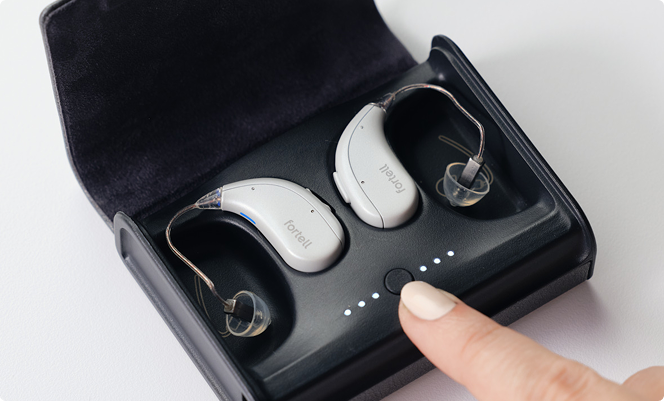
To reset, dock your hearing aids in the case. You will see the case lights turn on for each hearing aid. Press and hold the button on the case for 5 seconds until the white lights start alternating. When your hearing aids have reset after 30-60 seconds, place them in your ears to see if the issue is resolved.
Step 3
If you don't have your case on hand, you can reset the hearing aids using the hearing aid buttons.
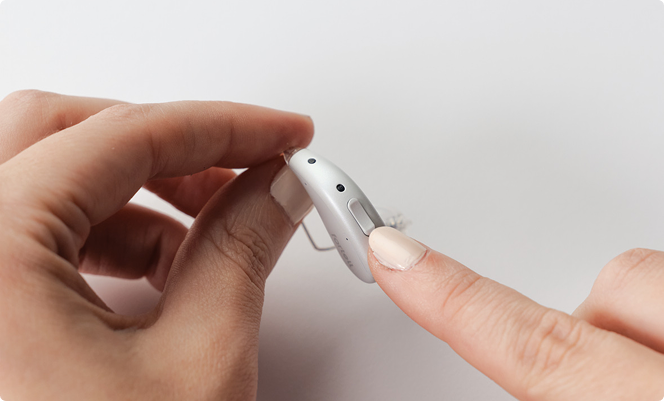
On your Left hearing aid, press and hold the Lower button for 15 seconds.
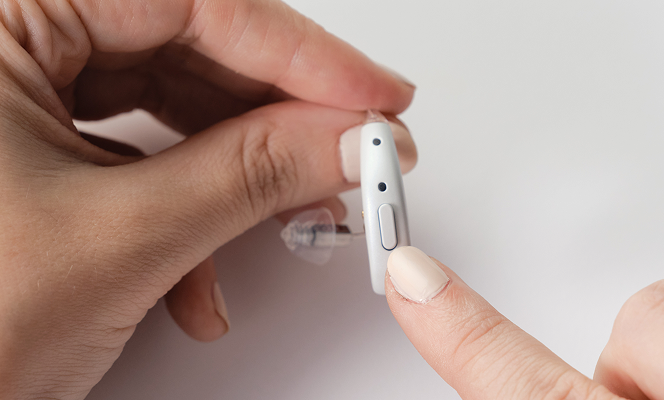
Repeat on your Right hearing aid – press and hold the button for 15 seconds. After about a minute, you should hear the hearing aids turn back on. You can do this with them on or off your ear. Once both hearing aids have reset, place them on your ears to see if the issue is resolved.
Step 4
If none of these steps work, we’re happy to help! Send us a message or call us at (917) 410-5407.